Git and GitHub for beginners
Use Git to save versions of your project and GitHub to share those versions with your team.
You changed a file and want to keep the old version. Git lets you save a snapshot, compare it with earlier ones, and share it when you're ready.
What is Git?
Git is a version control system. Each commit saves a snapshot from the staging area, along with a message, author and date. Git stores that history in a repository on your computer, so you can commit and look up old versions offline.
What is GitHub?
GitHub hosts Git repositories online. You can push your commits there so teammates can fetch them, and you can pull in their changes. The hosted copy is one example of a remote repository.
From your folder to GitHub
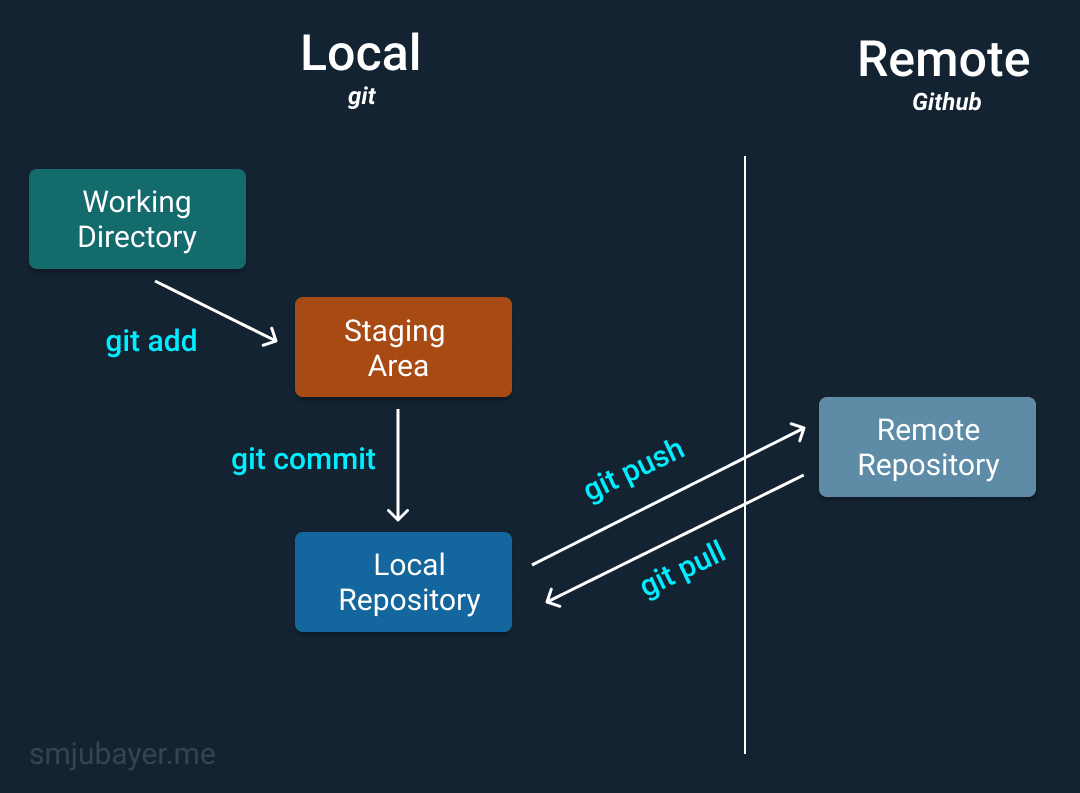
- Edit files in your working directory.
- Run
git addto stage the changes you want to include. - Run
git committo save the staged snapshot in your local repository. - Run
git pushto send your commits to the remote.
If you're joining an existing project, git clone creates your local copy. In that copy, git pull fetches changes and integrates them into your current branch.
Git branches
A branch points to a commit. You can start a branch from your current commit to work on a feature. As you commit on that branch, its pointer moves forward.
.gitignore
Put patterns for untracked files you want Git to ignore in .gitignore. A rule for node_modules/, for example, keeps installed dependencies out of git status and ordinary git add runs. Files Git already tracks stay tracked.
Follow the basic Git commands to set up your first repository.