Save a JWT automatically in Postman
Save the JWT from a login response to a Postman environment and send it with later requests.
When you test a protected API in Postman, you can save the token from a successful login and reuse it on later requests.
Set up the environment
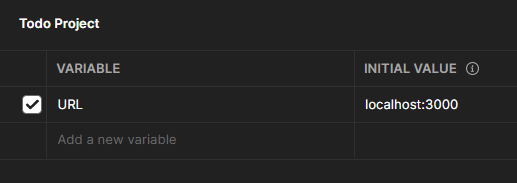
Create an environment named Todo Project. Add a variable called URL with a value such as http://localhost:3000, save it, and select the environment. You can now use {{URL}}/user/login for the login request.
Save the token on login
diagram
How the token moves from the login response into every later request
When this post was published in July 2022, the login request's script went in the Tests tab. November 2026 update. Open Scripts → Post-response.
if (pm.response.code >= 200 && pm.response.code < 300) {
  const { token } = pm.response.json();
  if (typeof token === 'string' && token.length > 0) {
    pm.environment.set('JWT_TOKEN', token);
  }
}
Send the login request with valid credentials. The script expects a top-level token property in the JSON response. After a successful login, JWT_TOKEN holds the new token in the active environment. If login fails, any previously saved token stays in place.
Send the token with a request
Open {{URL}}/todos, go to Authorization, and select Bearer Token. Enter {{JWT_TOKEN}} in the Token field. Postman adds the Bearer prefix to the header. Keep the token value local to your environment.